A spreadsheet like a financial statement (income statement, etc) contains columns for each fiscal year. When loading these into a data warehouse, you may want to turn each column into an individual record. For example, store "Total Revenues" for 2009 as one record, and Total Revenues for 2010 as another. To do this, use a Pervasive Map Designer Transformation with multiple MapPut records for each source record column.
Wednesday, December 29, 2010

Tuesday, December 28, 2010
Building a Flexible Transformation
In Pervasive Map Designer, you create a Transformation based on a source and a target schema. But as time goes on, the source and target schemas may change. If your Transformation is in a production setting, you may not be able to change right away. As long as the changes to the source or target schemas are additive, you may not have to.
When Good Lookups Go Bad
[RDBMS] While Pervasive Data Integrator Lookup Functions provide functions that can be re-used throughout your transformation, they can suffer from performance problems. To avoid running a query (the implementation of a Lookup Function), use a query rather than a table as the source of a transformation.
Monday, December 27, 2010
Why Use a Lookup Function?
Several blog posts and tutorials have been created for Pervasive Data Integrator Lookup Functions. In Data Integrator, a Lookup Function is a SQL query or file read that takes a key and returns a value, possibly a default. The returned value can then be used in a target mapping in Map Designer.
Sunday, December 26, 2010
[TUTORIAL] The Incore Lookup Function
A video tutorial demonstration usage of creating an Incore Lookup Function through the Lookup Wizard. This example re-maps a region field in a spreadsheet of sales associates to new values. Sales associates previously classified as operating in the Northeast region are now broken out into New England and Mid-Atlantic regions. The source and target are Excel 2007 workbooks and the new mapping of region values -- the data for the lookup function -- is a sheet within the source workbook.
Saturday, December 25, 2010
[TUTORIAL] The Flat File Lookup Function
A video tutorial demonstration usage of creating Flat File Lookup Function through the Lookup Wizard. This example re-maps a region field in a spreadsheet of sales associates to new values. Sales associates previously classified as operating in the Northeast region are now broken out into New England and Mid-Atlantic regions.
Friday, December 24, 2010
The Dynamic SQL Lookup Function
Like the Incore Lookup Function, the Dynamic SQL Lookup Function is used on SQL sources like an RDBMS. However, Incore lookups aren't suitable for large data sets. That's because when the Incore lookup is initialized, the whole data set is read in, taking up memory. Dynamic SQL runs a SQL query with each lookup which reduces the memory footprint.
Wednesday, December 22, 2010
The Flat File Lookup Function
If your reference data is kept in a flat text file, there's an easy way to integrate it into a Pervasive Data Integrator. Use the RIFL function "Lookup" to swap one value out for another while a transformation is running.
Tuesday, December 21, 2010
The Incore Lookup Function
When loading data, you'll often need to consult with other sources to prepare your output. An example of this is to check the data against a common reference like part numbers, customer ids, or category codes. When this reference data exists and is maintained outside of a relational table, Pervasive Data Integrator's Lookup Functions are an excellent way to handle the data and build up a library of reusable components for future tasks.
Sunday, December 19, 2010
Upsert with MySQL
[For Windows]
To use an upsert for a MySQL target with Pervasive Data Integrator, you'll need to adjust one of the detailed settings in the driver. Navigate to the ODBC drivers from the Windows Control Panel. Select "Configure" for the DSN created for MySQL, and check the "Return matched rows instead of affected rows.
To use an upsert for a MySQL target with Pervasive Data Integrator, you'll need to adjust one of the detailed settings in the driver. Navigate to the ODBC drivers from the Windows Control Panel. Select "Configure" for the DSN created for MySQL, and check the "Return matched rows instead of affected rows.
File Names with Spaces
In Data Integrator, you may need to surround file names containing spaces with quotes. If you're doing string manipulations, you'll need to use a single quote so that there is no interference with the double quote.
Solving a File Access Mode Error
As a Java guy, I'm conditioned to allow the JVM or an app server to handle freeing up resources. With Pervasive Data Integrator, you may have to take care of this yourself. I recently generated a "File access mode" error in a process on a RIFL FileRename() function. I verified all of the file arguments, but the error persisted.
ATD Physical Model (Phase 1)
This post contains the physical model for Phase 1 of the All Travel Data physical schema. It's using a great feature in Enterprise Architect that will dim certain diagram elements based on a filter. The hotel tables and the common client table are flagged as Phase 1.0 and the cruise tables are for Phase 2.0.
ATD Processing Model (Phase 1)
This image is the Processing Model (Data Flow Diagram or "DFD") for the ATD DaaS example:
Documenting DaaS: Bring Back the DFD
The Data Flow Diagram was an essential part of systems design in the 80's but is still very useful in dealing with today's data-driven application, including Data-as-a-Service
Use a Null Connector to Use Maps with Args from Process Designer
Process Designer can pass variables to Map Designer for the source of a transformation
DJExport Creates New Tables
Using DJExport to output records to a MySQL table resulted in the table being replaced with DDL from the DJExport object.
Go Procedural: Loading More Than One Target Record Per Source Record (Part 2)
Second in a two-part series on using RIFL, DJImport, and DJExport to load more than one target record for a given source record
Go Procedural: Loading More Than One Target Record Per Source Record (Part 1)
First in a two-part series on using RIFL, DJImport, and DJExport to load more than one target record for a given source record
[TUTORIAL] The OnDataChange Event Handler in Pervasive Map Designer
This tutorial forms a convenient identifier from a business key. The business key is taken from a spreadsheet of unique names. The convenient identifier is an alpha-numeric string of 6 characters which is capitalized and stripped of special characters and whitespace.
Character-based Identifiers
When working with web applications, it's convenient to use an identifier like 'bekwam' or 'compId=101' rather than a full name like "Bekwam, Inc.". The latter contains special characters (spaces, periods, commas) will need to be encoded for handling on the web or for JavaScript processing. As a result, most web applications will use database identifiers to obviate the need for encoding.
Saturday, December 18, 2010
Splitting an Excel File with Pervasive Data Integrator
Use Process Variables, the Change Target Action, and a Before Put Record event to split an Excel file into several Excel files based on the data
DaaS Example Businesses
The DaaS example in this blog is a hub of travel information called All Travel Data. This gathers travel data from sources like hotels and cruise lines and publishes the data for interested consumers. A consumer could be a travel web site, a listing of services, or a marketing company arranging advertising.
Structured Schema Designer and schemaLocation
If you're working with complex XSDs, you may need to divide your definition into several schemas or may need to use a schema that was created by someone else. If this is the case, you'll need to import the other schemas and provide cues to tooling (like Pervasive's Structured Schema Designer) on where to find the other XSD files.
XSDs and Structured Schema Designer
For simple applications, XML can be shipped around without a detailed specification like an XSD (XML Schema) or DTD. An informal agreement about the elements and their contents can be made and if there is little ambiguity or change expected in the future, this may suffice. However, for cases where there is the potential for ambiguity in the XML contents, optional and wildly varying document structures, multiple versions, and multiple authors, an XSD is essential.
XML Modeling with Sparx Systems Enterprise Architect
A modeling tool is essential when creating XML-based data structures using XML Schema (XSD). It's important to be able to read the XSD -- and have the ability to create one by text editor -- but working with a graphical tool avoids spelling errors and type mismatches.
I use Sparx Systems Enterprise Architect (EA), Professional Edition, to create XSDs. Enterprise Architect is a robust tool for all sorts of modeling activities. I also use EA for Java class modeling, ETL data flow diagrams, RDBMS E-R modeling, and DDL script generation.
EA's XSD modeling features are based on UML class diagrams. Out-of-the-box, a standard UML class diagram can generate an XML Schema. However, you'll likely want to annotate the top-level package with an 'XSDschema' stereotype to provide for namespaces.
For more control over the generation of the XSD, use the XML Schema toolbox to build a UML-based diagram. The toolbox will automatically apply stereotypes like XSDcomplexType for exposing sequences and other custom types. I also give each UML member variable an XSDAttribute stereotype to use XML attributes; without XSDAttribute, EA will create a separate element for each member variable.
See a screen shot of a class' attributes with the XSDAttribute applied.
NOTE: XSDAttribute wasn't initially displayed in my stereotype drop down. I typed in XSDAttribute manually. EA generates the XSD using attributes for AddressType and XSDAttribute appears in the drop down now.
Creating XML is simple, but for complex data exchange over a long span of time, describing XML with an XSD is crucial. If you model in XSD, you should know the syntax and the standard. But for managing the versions, namespaces, and different schemas in a less error prone fashion, find a tool like EA.
This post is replicated from http://my.opera.com/walkerca/blog/xml-with-ea.
I use Sparx Systems Enterprise Architect (EA), Professional Edition, to create XSDs. Enterprise Architect is a robust tool for all sorts of modeling activities. I also use EA for Java class modeling, ETL data flow diagrams, RDBMS E-R modeling, and DDL script generation.
EA's XSD modeling features are based on UML class diagrams. Out-of-the-box, a standard UML class diagram can generate an XML Schema. However, you'll likely want to annotate the top-level package with an 'XSDschema' stereotype to provide for namespaces.
For more control over the generation of the XSD, use the XML Schema toolbox to build a UML-based diagram. The toolbox will automatically apply stereotypes like XSDcomplexType for exposing sequences and other custom types. I also give each UML member variable an XSDAttribute stereotype to use XML attributes; without XSDAttribute, EA will create a separate element for each member variable.
See a screen shot of a class' attributes with the XSDAttribute applied.
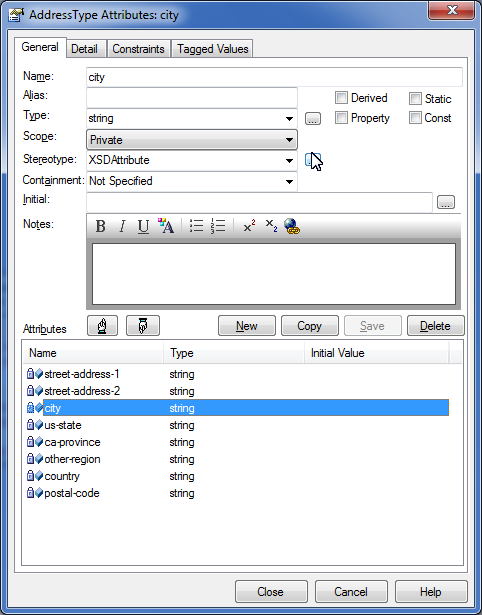
NOTE: XSDAttribute wasn't initially displayed in my stereotype drop down. I typed in XSDAttribute manually. EA generates the XSD using attributes for AddressType and XSDAttribute appears in the drop down now.
Creating XML is simple, but for complex data exchange over a long span of time, describing XML with an XSD is crucial. If you model in XSD, you should know the syntax and the standard. But for managing the versions, namespaces, and different schemas in a less error prone fashion, find a tool like EA.
This post is replicated from http://my.opera.com/walkerca/blog/xml-with-ea.
Building Data as a Service: An Architecture for Gather/Process/Publish
If your Data as a Service (DaaS) is based on a Gather/Process/Publish cycle, Pervasive Data Integrator can provide a great off-the-shelf implementation. For over 20 years, Pervasive has integrated, transformed, loaded, and extracted data for tens of thousands of customers. The architecture presented in this article is based on Data Integrator and is highly scalable, performant, and secure.
Data as a Service
When working on a business intelligence (BI) project, I frequently heard "just give me the data". This meant that the end data consumer wasn't interested in having our BI team create special reports. Rather, the consumer wanted a less refined product that the could then be used in a manner compatible with the consumer's technologies, analysis, and business rules.
Screen Scraping a Web Service
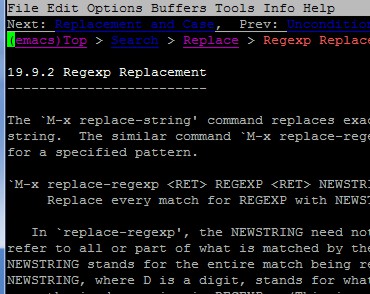
If you don't have access to a SOA or even a RESTful web service, but see data online that you need to access, consider using Pervasive's Extract Schema Designer and Map Designer to parse the HTML source and load well-formed records into your database. I call this "screen scraping" because the technique is similar to gathering data off of a mainframe terminal session. See this emacs help manual example where the third line in from the top will always give the section heading number and text.
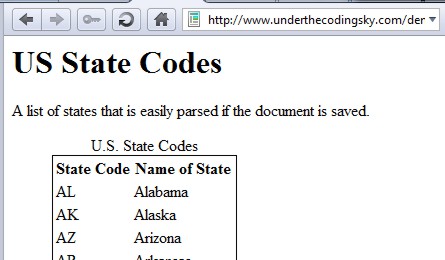
Take, for example, a web page displaying a table of 50 U.S. states and state codes. The underlying HTML contains a table with elements for the state code and the state name: States HTML.
If you save this file, you can build a schema for the file using Extract Schema Designer. Load the saved HTML file into Extract Schema Designer and mark off the lines and fields of interest. Extract Extract Schema Designer will produce a .cxl file that will be the source connector for a map. After setting up the source in Map Designer, set up the target (to an RDBMS table), then map the fields. In Part 2 of the tutorial, I use the Map by Position feature to quickly map the source fields to target fields since the names ('state_code' versus 'state_cd') don't completely match.
It's more robust to use a well-defined SOA or RESTful service and if the lines of HTML are compressed, it may not be worth the effort to screen scrape. However, with many sites using well-formed XHTML, you may get the data you need quickly. Make sure that you are legally allowed to load the data in your database first.
This post was replicated from http://my.opera.com/walkerca/blog/screen-scraping-a-web-service.
Take, for example, a web page displaying a table of 50 U.S. states and state codes. The underlying HTML contains a table with elements for the state code and the state name: States HTML.
If you save this file, you can build a schema for the file using Extract Schema Designer. Load the saved HTML file into Extract Schema Designer and mark off the lines and fields of interest. Extract Extract Schema Designer will produce a .cxl file that will be the source connector for a map. After setting up the source in Map Designer, set up the target (to an RDBMS table), then map the fields. In Part 2 of the tutorial, I use the Map by Position feature to quickly map the source fields to target fields since the names ('state_code' versus 'state_cd') don't completely match.
It's more robust to use a well-defined SOA or RESTful service and if the lines of HTML are compressed, it may not be worth the effort to screen scrape. However, with many sites using well-formed XHTML, you may get the data you need quickly. Make sure that you are legally allowed to load the data in your database first.
This post was replicated from http://my.opera.com/walkerca/blog/screen-scraping-a-web-service.
MySQL and Pervasive Data Integrator
To use MySQL with Pervasive Data Integrator 9 (Map Designer, etc.), you'll need to use ODBC. Although there are Linux ports for ODBC, Pervasive lists only the Windows versions as supported connectors. Get the ODBC MySQL driver for your Windows machine here.
Welcome
Hello,
I left the recent IntegratioNEXT 2010 conference in Austin with a profound appreciation for the fine work of Pervasive Software in making a world-class tool for dealing with data. I was so impressed, that I'm retooling my business (Bekwam, Inc.) to focus on services and software around Pervasive's fine products.
I left the recent IntegratioNEXT 2010 conference in Austin with a profound appreciation for the fine work of Pervasive Software in making a world-class tool for dealing with data. I was so impressed, that I'm retooling my business (Bekwam, Inc.) to focus on services and software around Pervasive's fine products.
Clear, Map, and Put
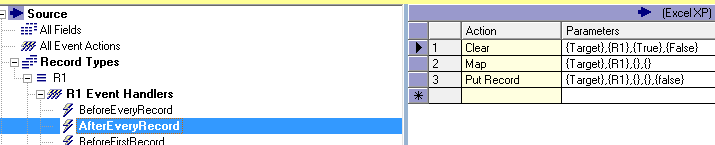
If you're doing mostly RDBMS table-to-table maps using Pervasive Map Designer, you might not have to worry about Event Handlers. That's because Pervasive produces a default behavior for straightforward maps where one input record (minus filters) corresponds to one output record. After you set up the source, target, and field mappings, Pervasive will add a ClearMapPut Action to the AfterEveryRecord Event Handler.
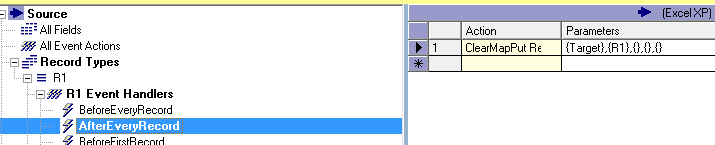
This screenshot shows a single Action for the AfterEveryRecord Event Handler which is a ClearMapPut. Map Designer added this Event Handler after a valid source and target were set up. For every source record (excluding filters), the target buffer is cleared (Clear). The map is applied to the buffer using the source data plus any RIFL expressions (Map). Finally, the buffer is written to the target (PutRecord or "Put").
This post is replicated from http://my.opera.com/walkerca/blog/2010/11/16/clear-map-and-put-4.
This screenshot shows a single Action for the AfterEveryRecord Event Handler which is a ClearMapPut. Map Designer added this Event Handler after a valid source and target were set up. For every source record (excluding filters), the target buffer is cleared (Clear). The map is applied to the buffer using the source data plus any RIFL expressions (Map). Finally, the buffer is written to the target (PutRecord or "Put").
ClearMapPut is a convenient shorthand for three distinct Actions: Clear, Map, and PutRecord. It's better to use the shorthand in most cases unless you want to deviate from the standard processing. Here's the functionality in longhand.
While you can do many table to table transfers with a cursory understanding of Actions and Event Handlers, it's crucial to deepen this understanding when working with hierarchical data structures like XML. That's because there is no longer a one-to-one correspondence between an input record and an XML element. Watch a tutorial I put together on XML processing that uses two Event Handlers (BeforeTransformation and AfterEveryRecord).
This post is replicated from http://my.opera.com/walkerca/blog/2010/11/16/clear-map-and-put-4.
Subscribe to:
Posts (Atom)